

Dr. Scherer is an assistant clinical professor at Loma Linda University, a clinical instructor at University of Nevada – Las Vegas, maintains a practice limited to prosthodontics and implant dentistry in Sonora, CA, and serves as Chief Clinical Advisor, Implants & Prosthetics for Zest Dental Solutions. He is a fellow of the American College of Prosthodontists, has published articles, books, and courses related to implant dentistry, clinical prosthodontics, and digital technology with a special emphasis on fullarch reconstruction. Dr. Scherer has developed and pioneered new approaches in 3D printing and CAD/CAM surgical systems, interactive CBCT implant planning, imaging and digital design concepts. Visit LearnDentistry.com.
Digital Design & 3D Printing Occlusal Guards
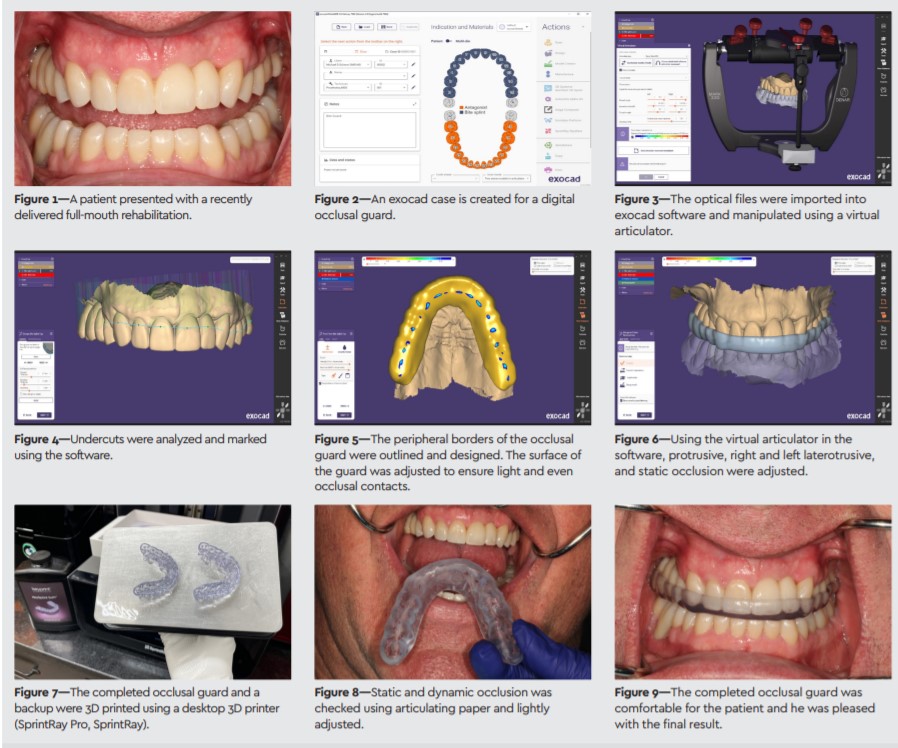
A63-year-old patient presented with the need for a full-mouth rehabilitation with crowns due to a history of parafunction and excessive grinding. Select teeth were removed due to extensive dental disease and implants were placed. After osseointegration, natural teeth were prepared, provisionals fabricated, and optical impressions made of the preparations. Individual ceramic crowns were placed on teeth preparations and implants.
At the delivery of his crowns, we had a discussion with the patient regarding a long-term occlusal device. Due to his extensive history of excessive parafunctional habits and grinding forces that led to the original breakdown of his natural teeth, an occlusal guard was proposed. We advised him that it was indicated to help stabilize not only his joint, but also the ceramic restorations. The patient agreed to proceed with fabrication of an occlusal guard. The teeth were isolated and dried, and an optical impression (TRIOS, 3Shape) was made of the completed restorations in occlusion.
Designing the Device
Optical impression files were exported from the scanner. The files were imported into a dental laboratory software (exocad, exocad GmbH), where a virtual case was created in the patient’s name. The optical scans were manipulated to permit visualization of the arch of teeth and occlusion analyzed. Using a virtual articulator, the occlusal vertical dimension was altered and opened until sufficient room existed between the maxillary and mandibular dentition. The use of the articulator permitted opening the vertical dimension on an arc like using a physical articulator on a laboratory bench.
Undercuts were analyzed and marked on the maxillary arch. An outline of the periphery of the occlusal guard was indicated and drawn virtually on the software. The occlusal guard shape was manipulated so that it would be small and comfortable yet would cover the entire occlusal surface of the maxillary dentition and providing stabilization to the mandibular arch.
Adjustment and 3D Printing
The occlusal surface of the virtual guard design was adjusted until the opposing contacts were even and light throughout the arch. The virtual articulator was opened and virtual protrusive, right laterotrusive and left laterotrusive movements were manipulated to adjust the excursive movements of the occlusal device. The completed guard was exported from the software into a dental 3D printer software and printed on a desktop 3D printer (SprintRay Pro, SprintRay) using a thermoplastic occlusal guard resin (KeySplint Soft, Keystone Industries). Two occlusal guards were printed for the patient, one for use now and one for backup in case the first one is lost. After printing, the guard was washed in a series of alcohol baths and UV cured. Polishing was completed using pumice and water.
Occlusal Guard Delivery
The patient returned for occlusal guard delivery. The guard was placed in a bath of warm water to enhance comfort of insertion and removal of the device. The guard was placed onto the maxillary arch and allowed to cool. Verification of static and dynamic occlusion was completed using articulator paper, and minor adjustments were made to the guard. The patient felt comfortable with the guard in his mouth, and learned how to insert and remove the guard prior to dismissal.
EXOCAD DENTALCAD
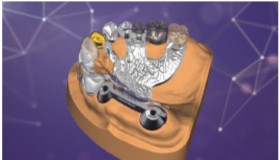
exocad DentalCAD is the leading OEM-branded dental CAD software—great for beginners and even more powerful in the hands of an expert. The software is known for its speedy operation and ease of use, helping to minimize training costs and maximize productivity. It is reliable and robust, even for solving complex cases on a daily basis. DentalCAD’s core version supports the design of various esthetic and functional dental restorations and appliances based on individual anatomies and requirements. Service offerings are easily extended with one or more of exocad‘s fully integrated add-on modules.
